Choosing Your Role (Homeroom / Subject Teacher)
In focusang, the features available depend on your role. Setting your role correctly helps you use focuspang more effectively.
Difference Between Roles
Homeroom Teacher
- Manages the entire class
- Can oversee all subjects for students
- Creates and manages classes by homeroom
Subject Teacher
- Teaches only specific subjects
- Can teach the same subject across multiple classes
- Creates and manages classes by subject
How to Change Your Role
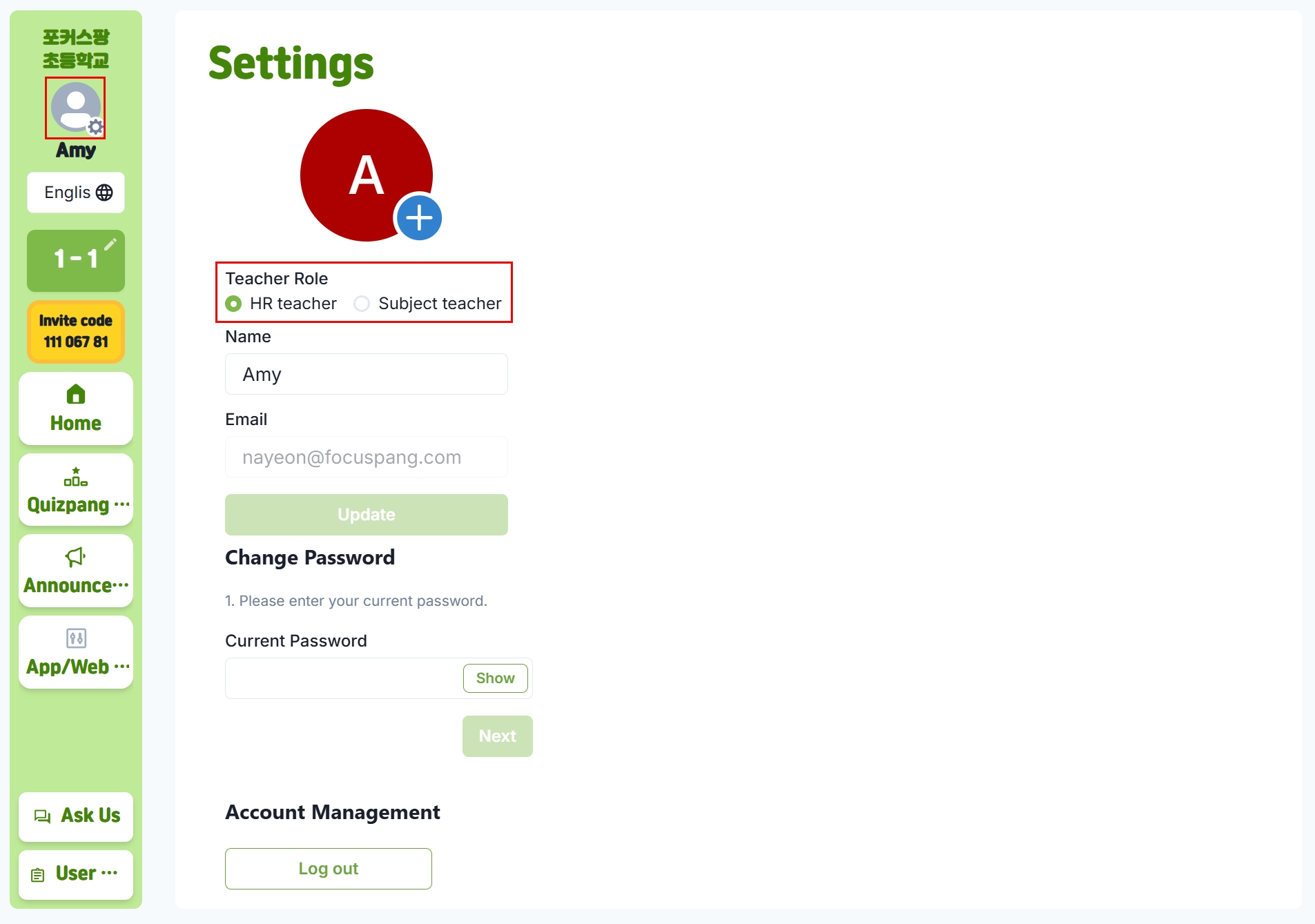
Step 1: Go to Settings
Click your profile picture or name at the top left of the home screen.
Step 2: Select Role
Switch between Homeroom Teacher and Subject Teacher as needed.
Which Role Should I Choose?
- Homeroom Teacher: If you teach all subjects to one class
- Subject Teacher: If you teach one subject across several classes (e.g., English, Music, Art)
Things to Keep in Mind
- Changing your role will adjust how you manage classes
- Existing classes will remain intact
- You’ll be able to use features specific to your role
If Something Goes Wrong
If you cannot change your role or encounter issues:
- Refresh the page
- Log in again
- Contact your school administrator