4. Logout
When you finish a class or finish using focuspang, always log out. Logging out keeps your information safe and gets the device ready for the next person.
How to log out
📍 Left menu → [Settings]
Step 1: Open Settings
Click Settings under Management in the left menu.
Step 2: Log out
Click [Logout] under Edit Student Information.
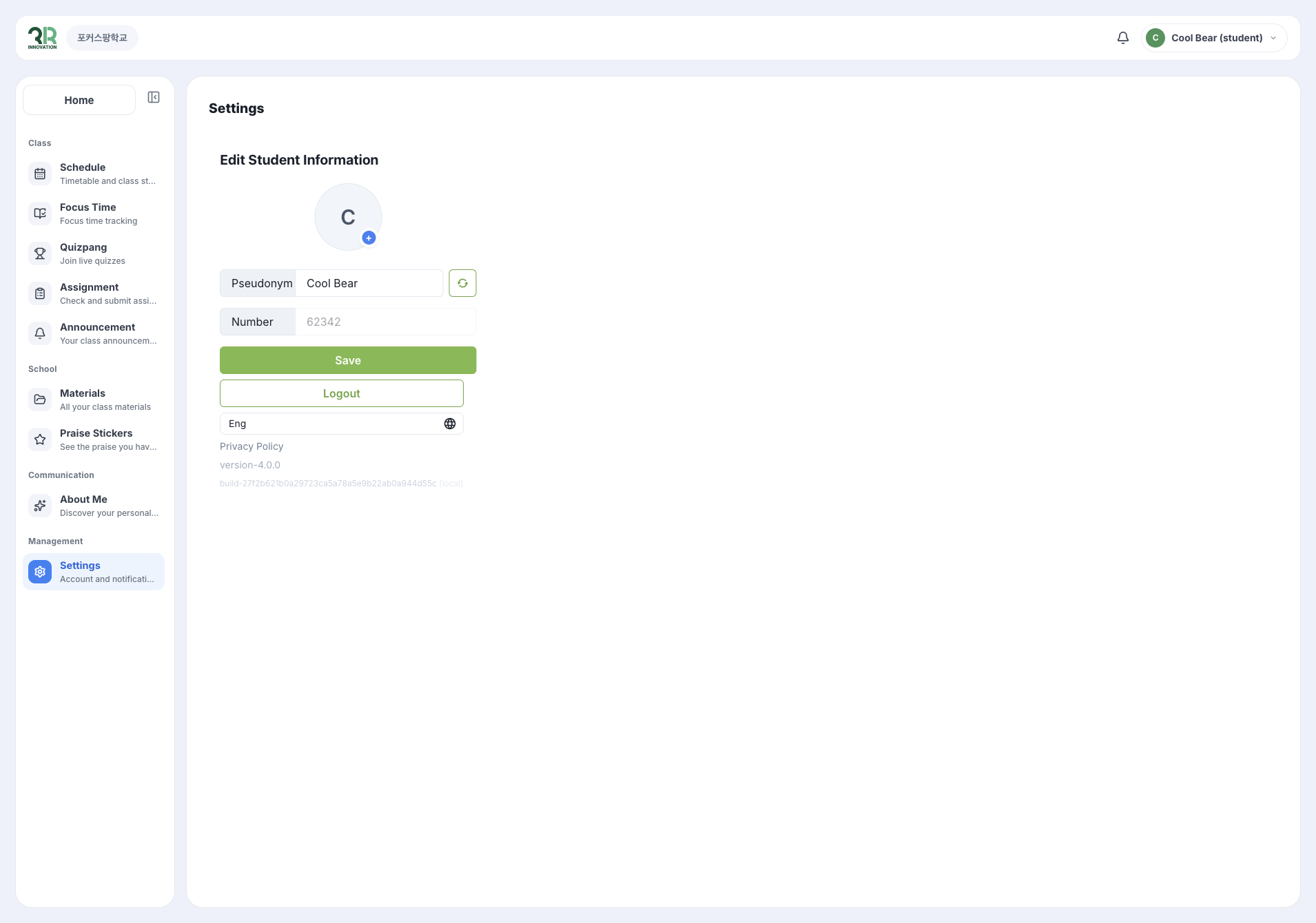
Other things you can do in Settings
- Pseudonym: Click the refresh button next to your pseudonym to get a new one, then click [Save].
- Language: Change the language with the menu below [Logout].
Always remember to log out
Make sure to log out in the following situations.
1. After classes
- Log out right after a class ends.
- Before a long break or lunchtime.
- Before going home, after using focuspang at school.
2. When security matters
- Leaving your seat, even for a short time.
- After using a friend’s device.
- After using a shared device, for example in the library.
Common problems
If you can’t log out
- Close the app: Exit the app completely and open it again.
- Restart your device: Restart your tablet or computer.
- Check the internet: Make sure you are connected.
- Ask your teacher: If the problem continues, ask your teacher for help.
If you are logged in on another device
- Log out on every device you used.
- Log in on only one device at a time.
- Ask your teacher for help if the problem continues.